
If a file is inside the list below, an iPhone or iPad can play it without your server touching it. That means the full quality of the file you own, a server that stays cool, and playback that starts immediately.
If it is outside the list, something has to rebuild it on the way, and you lose all three.
This page is that list, and what to do about the gaps.
Note
Hardware decoding is a property of the device. Whether you get the benefit of it depends on the app: a client that asks the server to re-encode by default will do so even when the device could have played the file untouched.
Video
| Codec | Apple hardware | Notes |
|---|---|---|
| H.264 | Yes, everything | The safe choice. Plays on every iPhone and iPad worth using. |
| HEVC 8-bit | Yes, modern devices | Hardware decoded, and half the file size of H.264. |
| HEVC 10-bit | Yes, modern devices | Includes most HDR material. |
| AV1 | Only the newest hardware | Everything older decodes it in software, badly, or not at all. |
| VP9 | Limited | Rare outside web video. Treat as unsupported. |
| MPEG-2 | No | Old DVD rips. Will always be rebuilt. |
| VC-1 | No | Older Blu-rays. Same. |
The short version: H.264 and HEVC cover almost everything anyone owns, and both are decoded in dedicated hardware, which is why a phone can play a 4K film for two hours without getting hot.
Tip
Storing a library in HEVC rather than H.264 roughly halves it at the same quality, and Apple devices handle it natively. It is one of the few decisions that saves money and loses nothing.
Audio
Audio is where more files come unstuck than video, and it is the cheaper problem to fix.
| Codec | Apple hardware | Notes |
|---|---|---|
| AAC | Yes | Universal. Never a problem. |
| MP3 | Yes | Universal. |
| AC3 (Dolby Digital) | Yes | Fine on modern devices. |
| E-AC3 (Dolby Digital Plus) | Yes | Fine on modern devices. |
| FLAC and ALAC | Yes | Lossless, and handled. |
| DTS | No | Very common on rips, and a frequent cause of transcoding. |
| DTS-HD MA | No | Same. |
| TrueHD | No | Same, and often Atmos is carried inside it. |
DTS is the single most common reason an otherwise perfect file gets rebuilt for a phone. Most releases that carry it also carry a simpler AC3 or AAC track alongside, and choosing that track is usually the whole fix.
Containers
| Container | Notes |
|---|---|
| MP4 and M4V | Native, always fine |
| MOV | Native |
| MKV | Depends on the app, not the device |
MKV is worth understanding, because the advice about it is usually wrong.
A container is a wrapper. Apple’s own frameworks do not read MKV, which is why Apple’s own apps cannot open one. That is a software limitation, not a hardware one, and an app that brings its own demuxer reads MKV perfectly well and hands the streams inside to the same hardware decoder.
So “an iPhone cannot play MKV” is true of some apps and false of the device. Whether your MKV plays untouched depends on what is inside it, and on your client.
Note
JellyMold reads MKV directly and hands the video to the hardware decoder. An MKV containing HEVC and AAC plays as it is, at full quality, with no work asked of your server.
Subtitles
| Format | What happens |
|---|---|
| SRT | Text, rendered by the player. No transcode. |
| ASS and SSA | Text with styling. Usually rendered. No transcode. |
| PGS | Images, from Blu-ray. Often burned in, which rebuilds the video. |
| VOBSUB | Images, from DVD. Same. |
This is the one that surprises people, because switching subtitles on changes whether the film transcodes at all. Text is free. Pictures are expensive.
Set up OpenSubtitles on your Jellyfin server gets you text subtitles automatically, which removes the problem for good.
The file that plays everywhere
If you are choosing a format to standardise on for Apple devices:
- Video: HEVC, 8-bit or 10-bit. H.264 if you also have older hardware.
- Audio: AAC or AC3. Keep the DTS track as a second track if you want it for a television, but do not let it be the only one.
- Container: MKV is fine with the right client. MP4 is fine with anything.
- Subtitles: external SRT files, or text tracks inside the file.
That combination direct plays on an iPhone and an iPad, and it is not a compromise: it is the full quality of what you own.
Check what you actually have
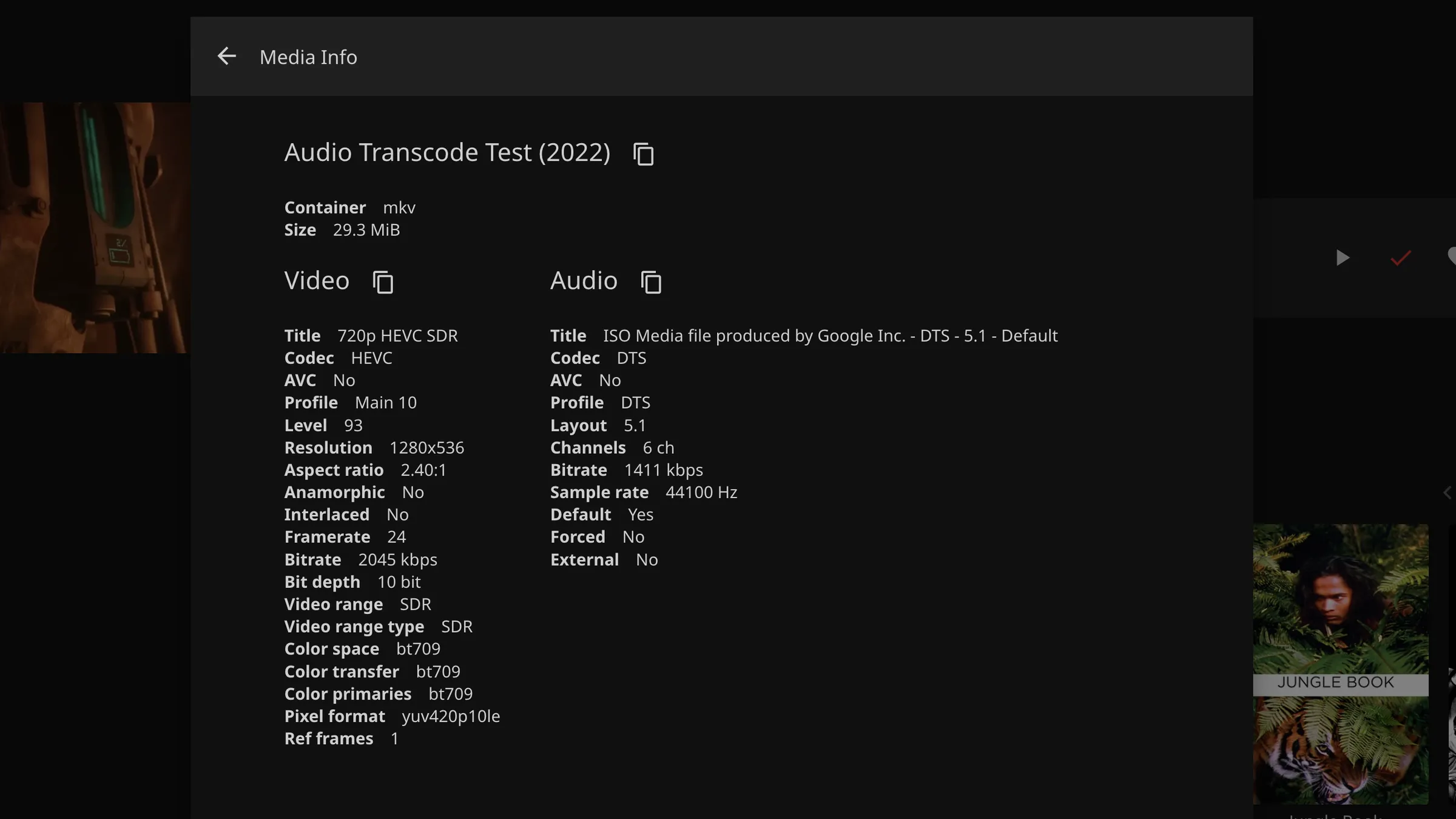
Before re-encoding anything, find out what your library is made of. A film’s media info page in Jellyfin lists every stream and its codec.
For the whole library at once, ffprobe will tell you per file, and most media
managers will show codec columns across a whole folder. The usual discovery is
that the library is already mostly fine and a dozen awkward files are causing
all the trouble.
Careful
Do not re-encode a whole library on the strength of this page. Re-encoding is lossy, and a file that transcodes occasionally is better than a library you have degraded permanently. Fix the handful of files that actually cause problems.